Introduction
What is NeuroVecta?
Getting Started
Logging In
Quick Create UI
Sidebar Menu
Working with Files
Vector Databases
Uploading Files
Indexing Files
Querying Documents
Citation Rationales
FAQs
Contact

Querying Your Documents
Best practices for getting accurate and relevant results
The Chat Interface
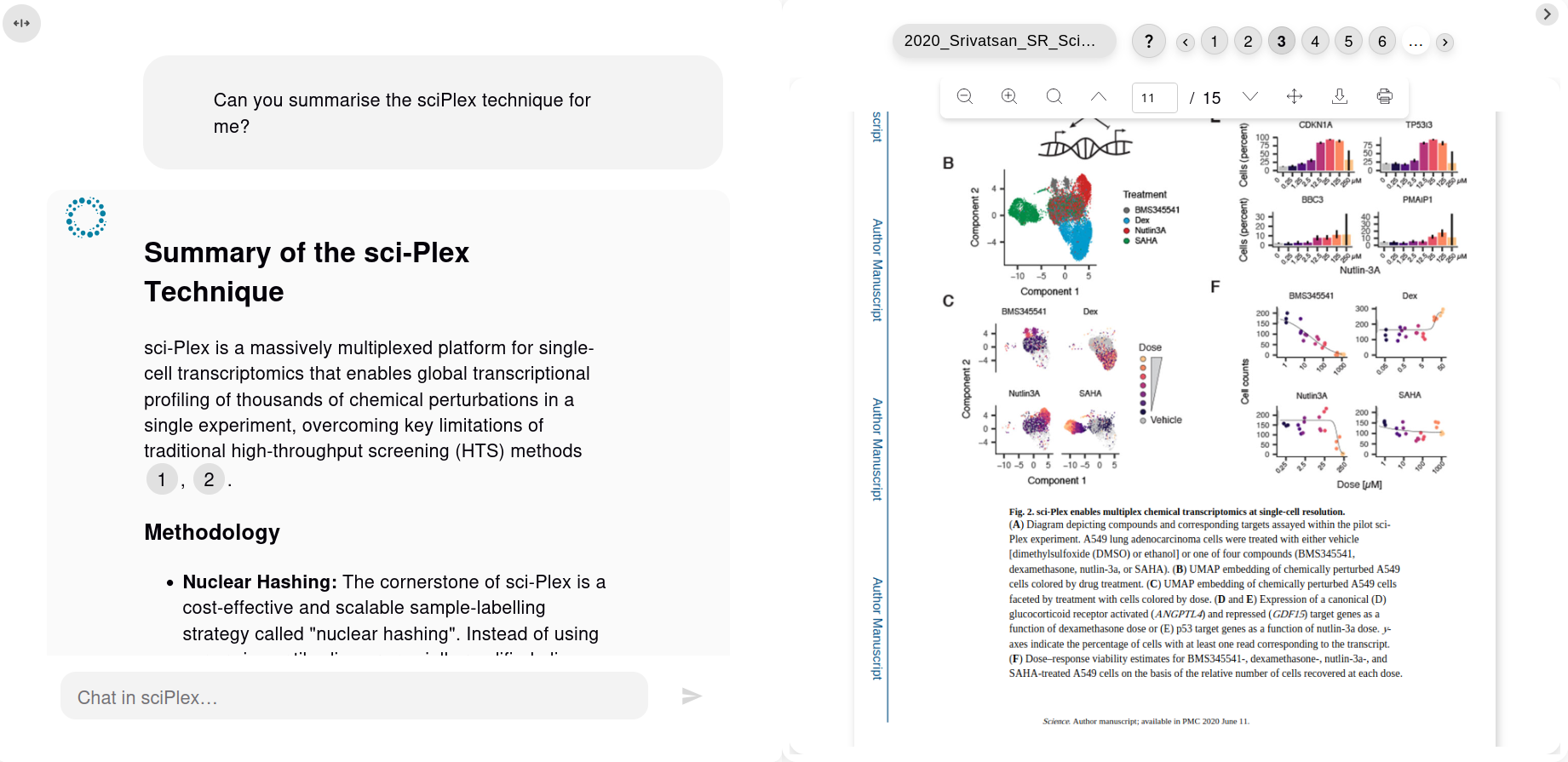
NeuroVecta's chat interface provides a natural, conversational way to interact with your document database. Simply type your question in plain English, and the AI will search through your indexed documents to provide accurate, cited responses.
Each response includes numbered citations that link directly to the source documents, allowing you to verify the information and explore the full context. Click any citation number to view the exact page and paragraph where the information was found.
How to Query Effectively
NeuroVecta uses semantic search to understand your queries and retrieve relevant information from your documents. Follow these best practices to get the most accurate and helpful responses. Learn more about natural language processing.
Best Practices
Be Context-Specific
For best quality results, avoid broad or overly general prompts (e.g., "Summarise all documents"). NeuroVecta retrieves information based on meaning, not document count.
✓ Good Example:
"What are the key findings about protein synthesis in the 2024 research papers?"
✗ Less Effective:
"Tell me about everything in my documents."
Prompt Flexibility
You may instruct the AI to take on specific roles or approaches to tailor the response style.
Example:
"As a scientific researcher, present the findings on climate change impacts from the reports, focusing on statistical evidence."
Conversational Awareness
Chat sessions remember context from earlier queries, enabling multi-turn conversations. You can ask follow-up questions, request clarifications, or dive deeper into specific topics without repeating context. Learn more.
Query Examples by Use Case
Research & Analysis
• "Compare the results from Study A and Study B regarding vaccine efficacy."
• "What gaps in the research are identified across these papers?"
Legal & Compliance
• "How do these policies address data privacy requirements?"
• "What penalties are specified for non-compliance?"
Verify with citations.
Technical Documentation
• "What are the system requirements for deployment?"
• "Explain the error handling process in the API documentation."
Business Intelligence
• "Summarise the competitive advantages mentioned in the strategy documents."
• "What risks are highlighted in the financial analysis of our latest annual report?"
Tips for Better Results
Use Natural Language
Write your queries as you would ask a colleague. NeuroVecta understands natural language and doesn't require special syntax or keywords.
Refine Based on Results
If the first response isn't quite what you need, refine your question or ask for clarification. The conversational context is maintained throughout the chat session.
Remember
NeuroVecta is designed for qualitative information retrieval and synthesis. For best results, focus on questions that require understanding, explanation, or summarisation of natural language content. Have questions? Check our FAQs or contact support.